
SONIC Drive-In - Order Online
Sonic Industries Services, Inc.Food & Drink
4.693.58K Reviews
- Version
- 2026.20.8
- Installs
- 10.00M
- Age Rating
- Everyone
Screenshots


Our Review of SONIC Drive-In - Order Online
 Analysis by Appyee
I usually judge a restaurant app by what happens when I am hungry, distracted, and trying to place an order quickly. SONIC Drive-In - Order Online is built for that exact moment: choosing food from Sonic Drive-In, arranging delivery or pickup, and earning rewards along the way. It is a free Food & Drink app from Sonic Industries Services, Inc., and its large audience gives it a solid 4.6 average from around 769 thousand ratings. I found it most useful when I already knew which Sonic location I wanted and could spend a minute checking the order details before paying.
The app is not a general restaurant discovery tool, and that distinction matters. Its value comes from putting Sonic ordering and rewards in one place rather than making you rely on a browser, a phone call, or a separate delivery service. The experience is strongest for regular customers who want a repeatable way to order. It is less compelling if you rarely visit Sonic, need to compare several restaurants, or expect every location and every ordering option to behave identically.
Getting past the points where ordering can stall
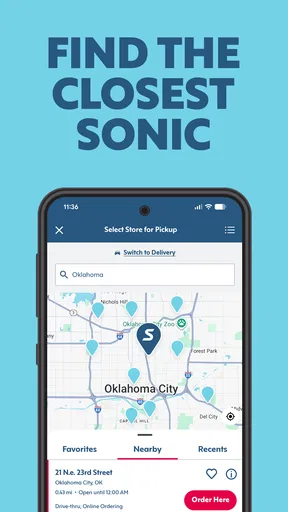
The first practical hurdle is location selection. Before browsing the menu too deeply, I would confirm that the chosen Sonic Drive-In is the one that can actually serve the order. A nearby location may be convenient on a map but unsuitable for the timing or order method I have in mind. Starting with the location and then checking whether pickup or delivery is available prevents the most frustrating kind of wasted effort: building a meal and discovering at checkout that the selected restaurant cannot complete it.
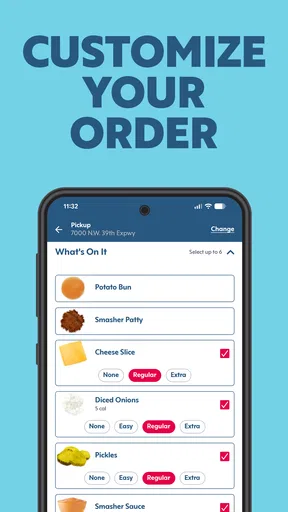
Another common sticking point is treating the menu as if it were identical everywhere. Restaurant apps often present a familiar brand menu, but the choices shown during ordering depend on the selected location and the way the order is fulfilled. I recommend reading the item screen rather than relying on memory, especially when changing sides, drinks, or other selections. A quick review of the customization choices is more useful than assuming the app will reproduce a previous order perfectly.
The best habit is to choose the location and order method before making detailed selections. That simple sequence keeps the rest of the session anchored to the right Sonic. It also makes it easier to notice when an item, option, or timing choice changes after switching from pickup to delivery.
Rewards are another area where users can become confused. The app’s central appeal is not only ordering online but also earning rewards through those orders. I would therefore make sure I am using the same account consistently instead of placing some orders anonymously, some through a browser, and others through the app. Mixing identities can make the experience feel unreliable even when the order itself worked correctly.
There is also a difference between an order being accepted and an order being ready. The app can be the place where the order is submitted, but preparation and handoff still depend on the selected Sonic. If a pickup seems slow, checking the order status and the selected location is sensible before assuming the application failed. For delivery, the handoff involves more moving parts, so delays should not automatically be interpreted as a menu or payment problem.
Small setup checks that save time later
On iPhone or iPad, the current version is 2026.16.13 and the minimum operating system is iOS 11. That makes the compatibility requirement relatively approachable for supported Apple devices, but an older phone can still create trouble if the operating system, app installation, or account session is out of date. I would begin by checking that the device can install the current release and that there is enough free space for a normal update.
Because the app is free, installing it does not require a purchase decision. The real setup work is making sure the account details, chosen restaurant, and preferred order path are correct before I start filling the basket. I would also avoid beginning an order on an unstable connection. If the menu loads slowly or the screen repeatedly resets, switching to a reliable Wi-Fi or mobile connection before customizing food is less frustrating than trying to recover a half-finished basket.
The age rating is Everyone, which fits the app’s basic purpose: browsing Sonic food, ordering, and managing the related rewards experience. That does not mean every ordering situation is equally simple for every user. A person ordering for a group still needs to check quantities, customizations, and the final handoff details carefully. The rating describes suitability, not a guarantee that the checkout process will be effortless.
I would also make a deliberate choice between pickup and delivery at the beginning. Pickup is usually the cleaner workflow when I am already near a Sonic or want more control over when I arrive. Delivery is more convenient when leaving home is difficult, but it adds dependence on address accuracy, local availability, and the delivery process itself. Selecting one path and staying with it avoids having to rebuild the order after a late change.
A reliable order routine for busy days
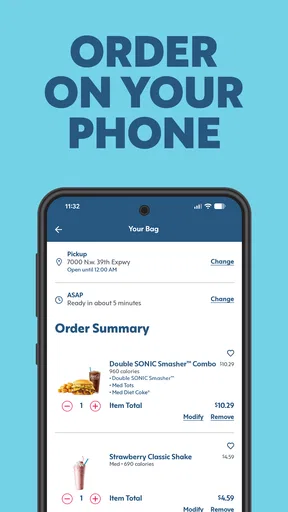
My preferred routine is straightforward. I open the app, select the intended Sonic, choose pickup or delivery, and then build the order slowly enough to catch required choices. Before submitting, I read the item names, quantities, customizations, location, and fulfillment method as one final checklist. This is especially worthwhile when ordering for more than one person, because an incorrect side or drink is easy to miss once the order has been sent.
For a realistic weekday example, imagine leaving work and wanting a quick meal on the way home. I would select the Sonic along my route rather than the closest location to the office, choose pickup, and place the order before driving. I would then verify the selected location again before arriving. That workflow uses the app for planning while leaving the actual collection to the restaurant, and it avoids trying to browse and order while parked in traffic or already at the stall.
For a family order, I find it more useful to separate the menu-building phase from the final review. Add each person’s meal, pause to inspect customizations, and only then consider whether anything needs changing. The app’s convenience can encourage fast tapping, but speed is not helpful if a missing modification means placing a second order or explaining a correction at pickup.
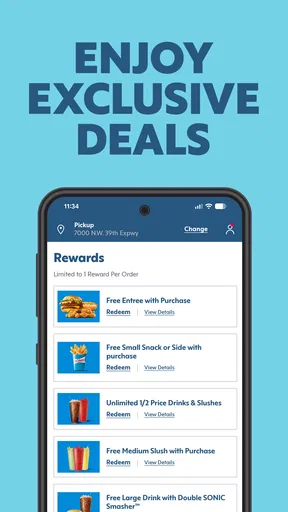
Rewards can influence how I time an order, but I would not let them override the basic checks. If a reward or account benefit appears during the process, I would inspect how it affects the basket before submitting. The practical trade-off is simple: saving a little through the rewards system is worthwhile only when the order still contains the right items and is going to the right Sonic.
Recovering when the workflow breaks
If the menu stops loading, I would first distinguish a temporary connection problem from an account or app problem. A basic recovery sequence is to check the internet connection, close and reopen the app, and try again without repeatedly tapping the same button. Repeated taps can make it harder to tell whether an action was accepted, especially around checkout.
If the app returns to an earlier screen, I would check whether the basket is still present before rebuilding anything. Recreating an order immediately can lead to duplicates if the first attempt actually went through. The same caution applies after a payment screen appears to freeze: first look for an order confirmation, account history, or another clear sign of submission before pressing the final action again.
When the wrong Sonic is selected, the safest recovery is to stop and correct the location before continuing. I would not assume that changing the address later automatically changes the restaurant or preserves every item choice. A short review after switching locations is worthwhile because the available menu and fulfillment choices can be tied to that selection.
If an order has been submitted but something looks incorrect, the app may no longer be the right place to solve every detail. The restaurant is the party preparing the food, so a time-sensitive pickup issue may require contacting the selected Sonic directly rather than repeatedly refreshing the app. That is not a criticism of the ordering interface; it is a reminder that digital ordering and restaurant operations are connected but not identical.
For a missing rewards result, I would first confirm that the order was made through the intended account and that I am looking at the same account used during checkout. I would keep any confirmation details available before seeking help. The useful lesson is to troubleshoot identity and order status separately: a successful food order does not necessarily mean I am viewing the correct rewards account, and a rewards display issue does not automatically mean the restaurant never received the order.
Recognizing problems that belong elsewhere
Not every delay is caused by the app. A Sonic may be busy, a delivery may take longer than expected, or a selected location may have limited availability at that moment. If the app clearly shows the correct restaurant and the order has been accepted, the remaining wait may be operational rather than technical. Refreshing repeatedly will not make food preparation faster.
Address errors are another example. If delivery details are incomplete or incorrect, reinstalling the app is unlikely to help. The useful response is to review the entered destination and the order information as soon as possible. For pickup, the equivalent issue is arriving at a different Sonic from the one selected. Checking the restaurant name before leaving is a small step that prevents a surprisingly awkward handoff.
Payment problems can also come from outside the application. A declined transaction, an expired payment method, or a temporary bank authorization issue may look like an app failure because it appears at checkout. I would avoid making several rapid attempts and would instead verify the payment details and whether an order was created. This reduces the risk of duplicate authorizations or duplicate orders.
The app is also not the best alternative for every kind of restaurant search. If I am comparing delivery fees, browsing many brands, or trying to coordinate food from several restaurants, a broader delivery marketplace may be more convenient. That option can provide wider choice, while the Sonic app is better suited to someone who has already chosen Sonic and wants the direct brand ordering route with rewards included.
Who will get the most from it
I would recommend it to regular Sonic customers, people who prefer pickup, and anyone who wants ordering and rewards handled in the same account. It is particularly practical for repeat meals because the routine becomes familiar: select the location, choose fulfillment, review the basket, and submit. The large install base, at over ten million installs, also suggests that this is an established way for many customers to interact with the chain rather than an obscure experiment.
It is less suitable for someone who visits Sonic only once, dislikes creating accounts, or wants a universal restaurant app. A person who already uses a delivery service for every meal may prefer keeping all orders in one place, even if that means giving up some of the direct rewards convenience. Likewise, people with very old devices should check compatibility before planning around the app; the current iOS requirement is version 11 or later.
The developer, Sonic Industries Services, Inc., gives the app a clear connection to the restaurant brand, which is useful when I want the official ordering relationship rather than a third-party menu. Still, that direct connection does not remove the need to compare pickup and delivery for the particular situation. Pickup is often the more predictable choice when I control the travel time, while delivery is the better fit when convenience matters more than exact timing.
My practical verdict after using it
SONIC Drive-In - Order Online succeeds when I treat it as a focused Sonic ordering tool, not as a complete solution to every restaurant problem. The free app makes sense for customers who want to order online for pickup or delivery and earn rewards during that process. Its strongest quality is the direct, repeatable workflow; its main weakness is that location, account, payment, and restaurant-operation issues can overlap and make the source of a problem unclear.
My advice is to set the location first, choose the fulfillment method early, keep the account consistent, and review the final order before submitting. If something goes wrong, check order status before trying again, then separate app issues from restaurant, delivery, address, or payment issues. Those habits matter more than rushing through the menu.
With an Everyone rating and a 4.6 average from a substantial user base, it is an easy app to consider if Sonic is already part of your routine. I would choose it over a general delivery app when I want a direct Sonic order and rewards in one place. I would choose the broader service when I need cross-restaurant comparison or a single delivery dashboard. For the right customer, the app is most valuable as a dependable shortcut to a familiar Sonic order, provided I take a moment to verify the details before tapping submit.
Privacy and Permissions
See what permissions an app requests and how it handles your data.
- Location
- approximate location (network-based), precise location (GPS and network-based)
- Photos/Media/Files
- read the contents of your USB storage, modify or delete the contents of your USB storage
- Storage
- read the contents of your USB storage, modify or delete the contents of your USB storage
- Camera
- take pictures and videos
- Wi-Fi connection information
- view Wi-Fi connections
- Other
- view network connections, full network access, run at startup, control vibration, prevent device from sleeping
Verdict
Strengths of SONIC Drive-In - Order Online
- Order ahead to reduce waiting at busy drive-ins.
- Customize burgers, drinks, and sides to match your preferences.
- Save favorite orders for faster repeat purchases.
- Rewards program offers points and occasional member deals.
- Curbside delivery brings orders directly to your selected parking spot.
Limitations of SONIC Drive-In - Order Online
- Menu availability and prices may vary by restaurant location.
- Promotional offers can include restrictions or limited redemption periods.
- App performance may depend on location services and internet access.
- Order changes or cancellations may be difficult after submission.
- Some locations may have limited parking spots for app-based pickup.
Similar Picks in This Category
View All
Rappi: Food Delivery, Grocery
Rappi, Inc - Delivery3.5

McDonald’s: Cupons e Delivery
Arcos Dorados4.3

Swiggy: Food Instamart Dineout
Swiggy4.7

Blinkit: Groceries & more
Blinkit4.8

foodpanda: food & groceries
Foodpanda GmbH a subsidiary of Delivery Hero SE4.0

Zomato: Food Delivery & Dining
Zomato4.7
Frequently Asked Questions
What can I do with the SONIC Drive-In - Order Online app?
The SONIC Drive-In app lets you browse the restaurant menu, customize food and drinks, place orders for pickup, and pay through your mobile device. You can select a nearby SONIC location, choose a stall or pickup option when available, and use the app to access current promotions, rewards, and order history. Features may vary depending on your location and restaurant availability.
Can I customize my SONIC order through the app?
Yes, the app generally allows you to personalize many menu items before adding them to your order. Depending on the product, you may be able to adjust toppings, sauces, ingredients, sizes, drink options, and other preferences. Customization choices can differ by restaurant, and certain substitutions or special requests may not be available during busy periods or at every participating location.
How does ordering and pickup work at SONIC?
After selecting a participating SONIC restaurant, you can add items to your cart, choose an available pickup method, and submit your order for preparation. Many locations support pickup at a drive-in stall, while others may offer options such as a drive-thru or counter pickup. Follow the instructions shown in the app and avoid arriving too early if the restaurant provides an estimated preparation time.
Does the SONIC app offer rewards, deals, or mobile-only promotions?
The application may include the SONIC loyalty program, digital rewards, limited-time discounts, and promotions available to registered users. Offers often have specific terms, expiration dates, menu restrictions, or location requirements, so it is important to read the details before ordering. Promotions can change frequently, and not every deal is available at every SONIC restaurant.
Is payment through the SONIC Drive-In app secure, and can I change or cancel an order?
The app supports mobile payment methods available in your region, which may include saved cards or other supported digital payment options. Review your order carefully before submitting it, especially the selected location, customizations, and pickup method. Once an order is sent to the restaurant, changes or cancellations may be limited, so contacting the location directly is usually the best option for urgent corrections.
